
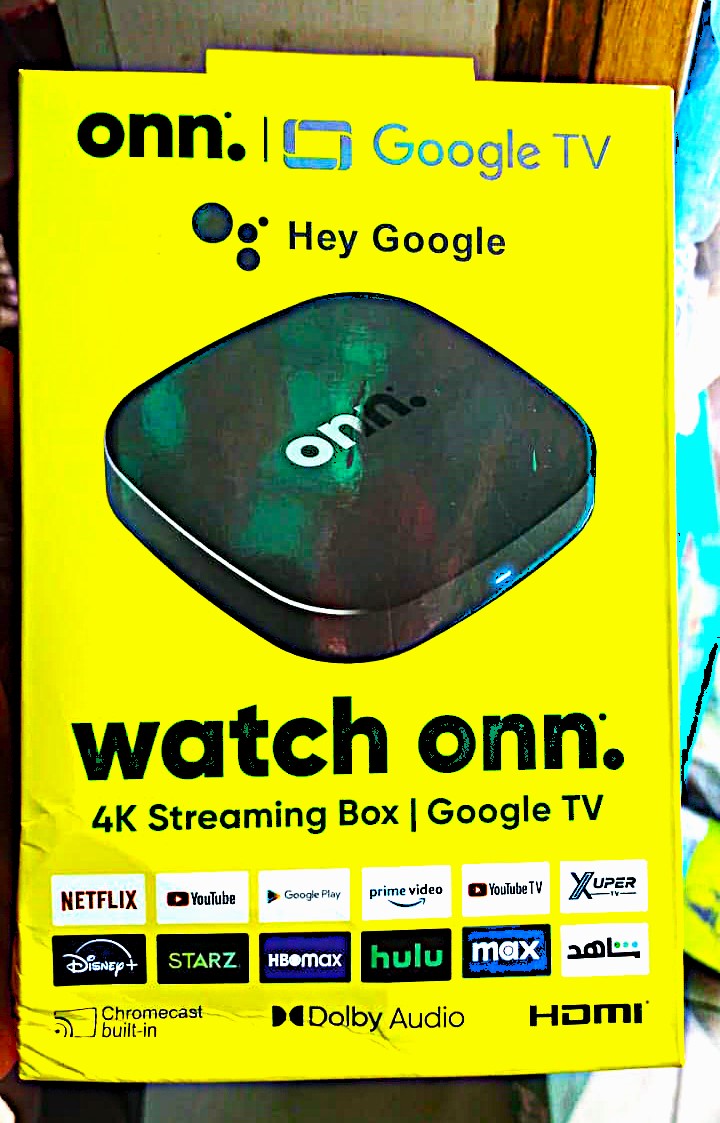
Enjoy Smart Entertainment with the onn. Google TV 4K Streaming Box
Upgrade your television with the onn. Google TV 4K Streaming Box. This compact device connects to a compatible TV through HDMI and gives you access to supported online entertainment apps.
First, connect the box to your television. Next, join your Wi-Fi network and sign in with your Google account. You can then explore movies, TV shows, music, videos and other digital content.
With Google TV, you can browse supported apps and find entertainment from one screen. In addition, the included voice remote makes it easier to search for content and control your viewing.
What Can You Do with the onn. Google TV Box?
1. Stream Movies and TV Shows
Enjoy movies, series, documentaries and other video content through supported streaming apps.
Google TV brings supported entertainment services together in one place. For example, you can access apps such as Netflix, YouTube, Prime Video and Disney+, depending on availability and compatibility.
Please note that some platforms require separate paid subscriptions.
2. Watch YouTube on Your Television
Enjoy YouTube videos on a bigger screen. You can watch music videos, interviews, tutorials, news, educational content and entertainment.
Instead of viewing everything on your phone, you can enjoy your favourite videos from your television.
3. Enjoy 4K Ultra HD Streaming
The onn. Google TV box supports 4K Ultra HD video streaming on compatible televisions and supported content.
As a result, you can enjoy detailed pictures when the app, video and TV support 4K playback. However, not every video or streaming service offers 4K resolution.
For the best results, use a stable internet connection and a 4K-compatible television.
4. Cast Content with Built-in Chromecast
The box comes with built-in Chromecast, also known as Google Cast. This feature lets you send supported content from a compatible phone, tablet or computer to your television.
For example, you can cast a YouTube video from your phone and watch it on a bigger screen.
Both devices must meet the app and network requirements for casting to work.
5. Use the Google Assistant Voice Remote
The included remote features Google Assistant voice control. Press the voice button and speak to search for shows, find videos or navigate supported services.
You can also use the remote to manage compatible TV functions. Therefore, you can enjoy more convenient control while watching your favourite content.
6. Listen to Music and Explore Online Content
Access supported music and media apps to play songs, explore playlists and enjoy other online content.
You can also switch between video and music services without relying only on your smartphone.
7. Enjoy Dolby Audio Support
The device supports Dolby Audio for compatible content and sound systems.
When your television or connected audio equipment supports the required audio format, you can enjoy sound designed to improve your viewing experience.
Actual audio output depends on the content, app, television and connected sound system.
2GB RAM and 8GB Internal Storage
The onn. Google TV box comes with 2GB RAM and 8GB internal storage.
The 2GB RAM provides memory for Google TV and supported apps. Meanwhile, the 8GB storage gives you space to install compatible apps and store system data.
Please note that the available storage will be less than 8GB. This is because Google TV and preinstalled apps use part of the internal space.
Enjoy Dual-Band Wi-Fi Connectivity
The box supports 2.4GHz and 5GHz Wi-Fi networks.
The 2.4GHz band offers wider coverage in many homes. On the other hand, the 5GHz band can provide faster connections when your router and network conditions support it.
For smoother video playback, connect the box to a stable Wi-Fi network.
How to Set Up the onn. Google TV Box
Setting up your streaming box is simple. Follow these steps:
- Connect the box to an available HDMI port on your television.
- Connect the supplied power adapter.
- Select the correct HDMI input on your TV.
- Follow the setup instructions on the screen.
- Connect the box to your Wi-Fi network.
- Sign in with your Google account.
- Open supported apps and start streaming.
You can then explore Google TV and arrange your entertainment apps.
What You Need to Get Started
Before using the onn. Google TV box, make sure you have:
- A television with an available HDMI port.
- A suitable power source.
- A working Wi-Fi connection.
- A Google account for setup and relevant services.
- Active subscriptions for paid streaming platforms.
- A 4K-compatible television and suitable content for 4K playback.
Important Product Information
The onn. Google TV 4K Streaming Box is designed to work with Google TV services and supported apps. However, app access and features may vary by region, software version and service requirements.
The advertised 4K resolution requires compatible content and a suitable television. Also, built-in Chromecast works with supported apps and compatible devices.
The device comes with 2GB RAM and 8GB internal storage. However, the operating system and preinstalled apps use part of the storage.
Please note that streaming subscriptions are not automatically included with the device. You may need to pay separately for some services.
Why Buy from idfinestores?
At idfinestores, we make it easier to shop for useful gadgets and entertainment accessories. You can order online and get support before and after delivery.
When you shop with us, you enjoy:
- Quality Assured products.
- Customer support when you need assistance.
- Same-day delivery in Lagos.
- Nationwide delivery within 48–72 hours.
- Free delivery on orders of ₦100,000 and above.
idfinestores 7-Day Testing & Reporting Guarantee
Your onn. Google TV 4K Streaming Box comes with a 7-Day idfinestores Testing & Reporting Guarantee.
After delivery, test the device and check that its main functions work. If you notice a functional fault, report it within 7 days. We will assess the reported issue under the applicable replacement terms.


Reviews
There are no reviews yet.